
Affiliate Disclosure: This post contains affiliate links. If you sign up through our link, we may earn a commission at no extra cost to you. This does not influence our opinions. Features and prices were checked in 2026 and can change, so please confirm details on the official GetResponse website before signing up.
The GetResponse free plan is one of the easiest ways to start email marketing without paying anything upfront. But “free” always comes with limits, and the real question is how far the plan can take you before you need to upgrade.
This guide explains what the free plan includes, what is missing, who it suits best and the signs that it is time to move to a paid plan. If you want the bigger picture first, read our full GetResponse Review 2026. If you are still choosing a platform, see our GetResponse vs Mailchimp comparison.
Table of Contents
GetResponse Free Plan: Quick Overview
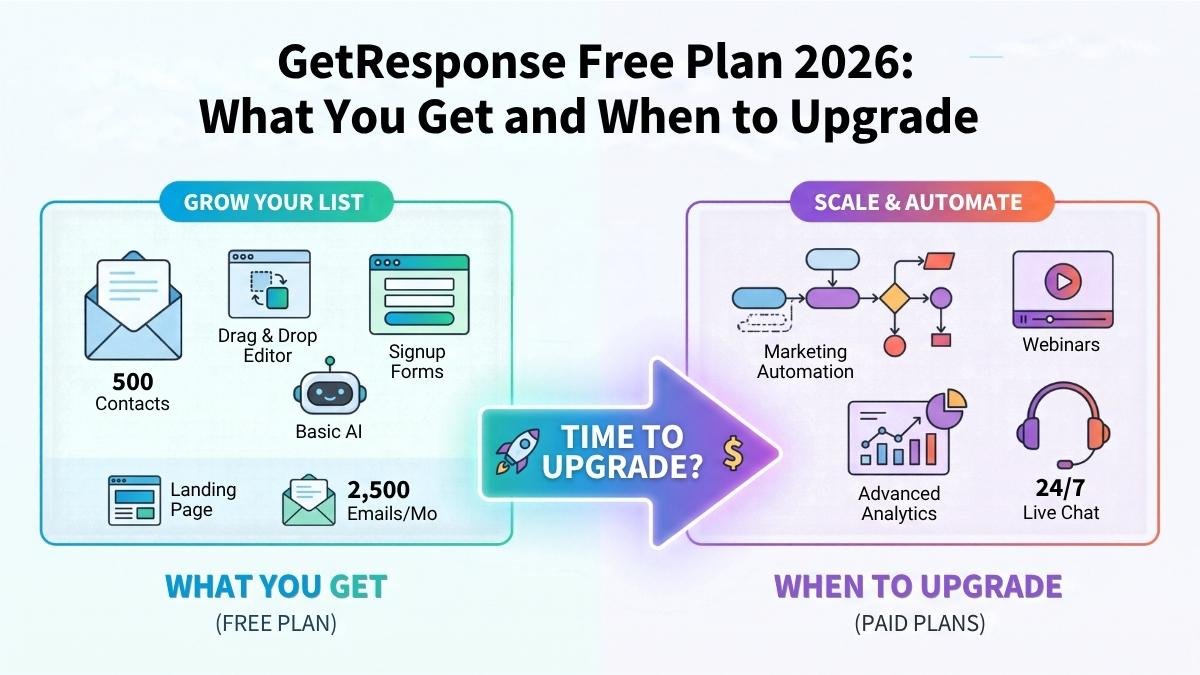
| Feature | Free Plan |
|---|---|
| Contacts | Up to 500 |
| Emails | 2,500 per month |
| Newsletters and email editor | Included |
| Landing pages | Basic, limited |
| Signup forms | Included |
| AI email tools | Basic access |
| Marketing automation | Not included |
| Webinars | Not included |
| Support | Limited; 24/7 live chat is for paid plans |
Free plan limits were checked in 2026. GetResponse updates its plans from time to time, so confirm the current allowance on the official pricing page.
What You Get on the Free Plan
Up to 500 contacts and 2,500 emails per month. This is enough to start a list, send a weekly newsletter and learn how email marketing works. For comparison, Mailchimp’s free plan was reduced in 2026, which makes GetResponse’s allowance look generous for beginners.
Drag-and-drop email editor. You can build newsletters from mobile-responsive templates without any coding. The editor is the same one paid users get, so you are not learning a stripped-down tool.
Signup forms and a basic landing page. You can collect subscribers from your blog, social profiles or a simple standalone page. This is the most important free feature for bloggers and affiliate marketers, because list building is the foundation of everything else.
Basic AI assistance. GetResponse’s AI can help draft email copy and subject lines from a prompt. It is a good time-saver if writing is not your strength.
Basic reporting. You can track opens, clicks and unsubscribes to see which emails work.
What the Free Plan Does Not Include
This is where most people hit the wall.
No full marketing automation. Visual workflows, behaviour-based journeys and lead scoring belong to the paid plans, with full automation on the Marketer plan. If you want to send different emails to people who click and people who do not, you will need to upgrade.
No webinars. Native webinar hosting is reserved for higher-tier plans.
Limited landing pages and no advanced testing. The free plan covers the basics, but serious lead-generation campaigns need more pages and A/B testing.
GetResponse branding and limited support. Free accounts usually carry platform branding and do not get the 24/7 live chat that paid users enjoy.
Who Should Use the Free Plan
The free plan fits you well if you are:
- A new blogger building your first email list
- A beginner testing email marketing before spending money
- A small business sending occasional newsletters
- An affiliate marketer collecting subscribers while the site grows
- Someone comparing platforms who wants a real test, not a demo
It is not the right fit if you already have more than 500 subscribers, need automated funnels from day one or plan to sell through webinars.
5 Signs It Is Time to Upgrade
- Your list is close to 500 contacts. Once you pass the limit, you will need a paid plan to keep growing.
- You want automated welcome sequences. Sending the same series of emails to every new subscriber automatically is the most common reason people upgrade.
- You need segmentation based on behaviour. Targeting readers who clicked a specific link or bought a product requires automation.
- You plan to run webinars. Live sessions with automatic follow-up emails need a higher-tier plan.
- You want faster help. If a campaign breaks and you need an answer quickly, 24/7 live chat on paid plans is valuable.
If two or more of these apply to you, upgrading will likely pay for itself.
GetResponse Paid Plans Compared
Prices below are in USD, based on monthly billing at the smallest contact tier.
- Free: up to 500 contacts and 2,500 emails per month
- Starter: from $19/month for 1,000 contacts
- Marketer: from $59/month for 1,000 contacts, with full automation
- Creator: from $69/month for 1,000 contacts, adding webinars and course tools
- Annual billing saves around 18%
Which upgrade makes sense? If you only need to send more emails to a bigger list, Starter is enough. If you want automated funnels, which is what most affiliate marketers and course sellers need, the Marketer plan is the real upgrade. Creator is for those selling courses or hosting webinars.
How to Get the Most Out of the Free Plan
- Start a lead magnet. Offer a short checklist or guide in exchange for an email address so your first 500 contacts arrive quickly.
- Send consistently. One email a week builds trust and shows you what your audience likes.
- Keep your list clean. Remove inactive subscribers so your 500 spots go to people who actually read.
- Collect consent properly. Follow CAN-SPAM in the USA, GDPR and UK GDPR in Europe and the UK, CASL in Canada and the Spam Act in Australia. Use clear signup forms and always include an unsubscribe link.
- Track results. Watch open and click rates for a few weeks before deciding whether to upgrade.
Pros and Cons
Pros
- Free plan with 500 contacts and 2,500 emails per month
- Professional drag-and-drop editor and templates
- Signup forms and a landing page to start building a list
- Easy upgrade path to automation and webinars
Cons
- No full automation on the free plan
- No webinars
- Limited landing page features
- Limited support compared with paid plans
Learn more about how AI is changing campaigns in HubSpot’s marketing statistics.
Deliverability and Legal Compliance
Wherever your customers live, you must follow local email laws. That includes CAN-SPAM in the USA, GDPR and UK GDPR in Europe and the UK, CASL in Canada and the Spam Act in Australia. Both GetResponse and Mailchimp provide consent tools, unsubscribe links and data protection features, but you remain responsible for collecting permission properly and honouring opt-outs.
Frequently Asked Questions
Is the GetResponse free plan really free? Yes. You can use it without paying as long as you stay within the contact and email limits. Always check the official site for current limits before signing up.
How many contacts can I have on the free plan? Up to 500 contacts, with up to 2,500 emails per month.
Does the free plan include automation? No. Full marketing automation is available on paid plans, starting with the Marketer plan.
Can I use the free plan for affiliate marketing? Yes, for building a list and sending newsletters. Always disclose affiliate links and follow the rules of your email and affiliate programs.
What happens when I pass 500 contacts? You will need to move to a paid plan to keep adding subscribers.
Is GetResponse free plan better than Mailchimp’s? For beginners, GetResponse’s allowance is currently more generous, since Mailchimp reduced its free plan in 2026. See our full comparison for details.
Final Verdict
The GetResponse free plan is a solid, low-risk starting point. It gives you a professional editor, signup forms and enough room to build your first 500 subscribers. When your list grows or you want automated funnels, the upgrade path is clear and the paid plans start at an affordable price.
The best way to decide is to try it. Start free, build your list and upgrade only when your goals demand it.
Ready to start?
Start Your Free GetResponse Account
Affiliate Disclosure: This post contains affiliate links. If you sign up through our link, we may earn a commission at no extra cost to you. This does not influence our opinions. Features and prices were checked in 2026 and can change, so please confirm details on the official GetResponse website before signing up.